Previously Users of Jetpatch need to map the local repositories Manually. They need to login into each endpoints and create/modify the .repo/ubuntu.list file which is time consuming.
As the part of Automation, We have created the built-in script Called "register linux endpoints with local repository".
This script has the backup functionality before modifying the file.
Supported Operating System to Map:
Redhat Enterprise Linux 7/8/9/10
Oracle Linux 7/8/9/10
Alma Linux 8/9/10
Rocky Linux 8/9/10
Ubuntu 18/20/22/24/26
Debian 11/12
Steps to Map the Linux Repository:
Gather the Urls. This Built-in tasks required 2 parameters, One is RepoAddress which is the fqdn or IP with http/https notation. Other Parameter is RepoComponents which is the components of the local repository.
RepoAddress:
This is the local repository url which has both ssl enabled as well as http.
IP or FQDN we are using to host the repository via Web Engine is called as RepoAddress. RepoAddress is Primary Parameter that can use it map the Website as local repository.
Note: Always remove the "/" in the end of the url.
RepoComponents:
RepoComponents refers to the OS components downloaded from a public repository to your local machine. These include baseline components, as well as any specific Repository IDs associated with your registrations or subscriptions. For example, as shown in the screenshot, you can use appstream, baseos were your primary component and space-separate additional components based on your environment's requirements.
Note: Separate multiple components using a single space.
Add the Script to Scripts:
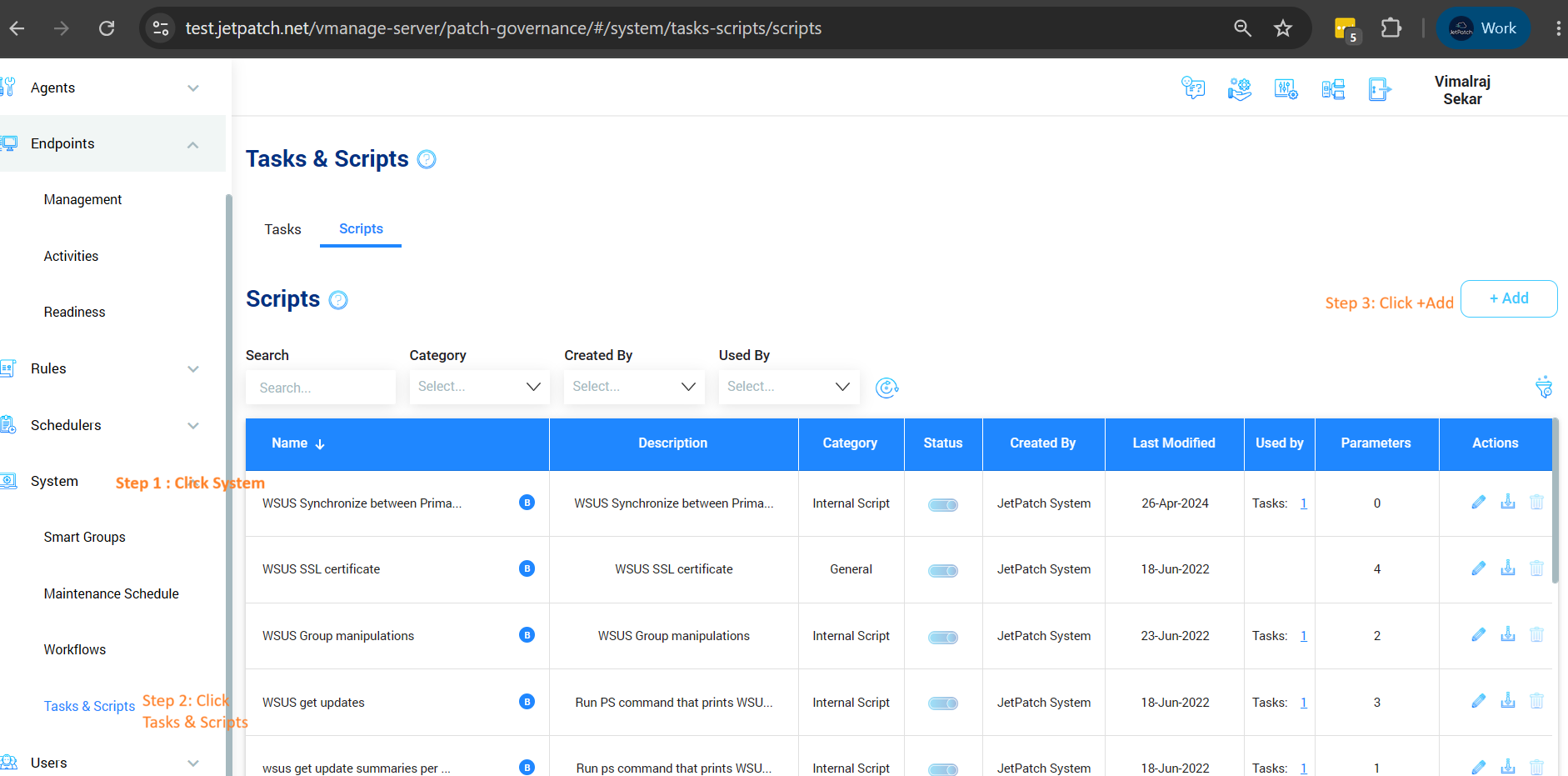
We can use the Built-in Script named as "Register Linux Endpoint with a Local Repository" or You can get the latest script from this ftp and add as the new script as per below image.
Systems->Tasks&Scripts->Scripts->Add
Once Script added by Browsing, you can choose the appropriate Operating Systems that we are going to change the Repository.
Once Saved. We able to create multiple tasks for multiple OS with same script.
Create the Tasks:
We can each separate task for each OS with the same script.
System->Tasks&Scripts->Tasks->Add
- Give the Proper name to identify OS.
- In Execution task source Choose Both
- in Script, Choose the script
- Execution Type, Choose Shell script
- Execution command, exactly as follows ./@file @RepoAddress @RepoComponents
- Click Parameters to add the both parameter variables.
- in RepoAddress you need to add the Repository url for example https://192.168.1.10/almalinux9 or full FQDN up to the point where the components folder begins.
- in RepoComponents you need to add Components (e.g.,
appstream baseos extras)., If your components has additional subdirectories likex86/appstream, ensure the path accurately mirros the structure on the actual hosting server. - Also RepoComponents for Ubuntu, you can add Components main name like jammy/focal/xenial/noble/resolute along with other components(e.g.,
jammy security update backports proposed) -
Once Parameters added, You can preview the url and components in execution preview.
Once Saved. You can run the tasks in Management by choosing the endpoints and in Actions -> run tasks.
Choose the task and run.
Check the Activities tab to view your task execution status (Completed or Failed).
Run a test on a single endpoint and verify the server configuration at the following locations:Ubuntu/Debian (Pre-24):
/etc/apt/sources.listUbuntu 24+:
/etc/apt/sources.list.d/ubuntu.sourcesEnterprise Linux:
/etc/yum.repos.d/jetpatch.repoTo configure Unified Local repository please follow this Article.
Comments
0 comments
Please sign in to leave a comment.